28 KiB
Executable File
nirc-rs
A multi-protocol terminal chat client written in Rust.
Design Philosophy
nirc-rs is built on a single conviction: your communications deserve a client that treats the terminal as a first-class interface, not an afterthought. Every design decision — from the naim-derived 8-color palette system to the yamux-multiplexed file transfer pipeline — is deliberate. The client consolidates seven chat protocols (down from eight — BitChat was withdrawn in 0.10.2; see NOTICES.md) into one unified, keyboard-driven interface with zero browser dependencies, zero Electron overhead, and zero JavaScript runtimes.
The architecture follows a layered design: protocol adapters at the bottom, an asynchronous event dispatcher in the middle, and a ratatui-based presentation layer on top. This separation means adding a new protocol requires implementing a single adapter trait — the rest of the system (tabs, logging, theming, file transfers, the menu bar) adapts automatically.
Version: 0.10.2 License: GPL-3.0-or-later Author: Jeremy Anderson — dcos.net Repository: https://git.dcos.net/dcosnet/nirc-rs
Architecture
nirc-rs is structured around four co-operating subsystems that communicate through typed channels:
| Subsystem | Responsibility |
|---|---|
| Protocol adapters | One module per protocol (irc.rs, matrix.rs, adc.rs, etc.), each speaking its native wire format and translating to and from the internal ChatMessage type |
| Engine | The async runtime core — Dispatcher routes incoming events to the correct tab, NotifyEngine handles desktop notifications with debouncing and urgency levels, Vault encrypts credentials at rest |
| Core | App manages the tab model (per-tab input, command history, scroll state, unread counts), Command is the exhaustive enum of every slash-command the client recognizes, VarStore provides user-defined variables, aliases, and key bindings with $1/$* template expansion |
| TUI | The presentation layer — NaimPalette maps the classic naim 8-color system (c00–c14) to ratatui Style objects, ChatView renders messages with per-protocol timestamp coloring, WinlistWidget provides the side-panel window navigator, and MenuBarState implements the F1 dropdown menu with __prompt: prefix conventions for commands that need user input |
Every protocol receives a three-character tag, a single-character badge, and a dedicated NaimColor for instant visual identification in the window list and status bar — by design, not by coincidence.
Protocols
nirc-rs implements protocol adapters as discrete, isolated modules. Each adapter handles connection lifecycle, event parsing, and outbound message formatting independently. The dispatcher presents a uniform interface to the UI layer, so a message from IRC and a message from Matrix are indistinguishable once they reach your screen.
| Protocol | Status | Transport | Adapter Details |
|---|---|---|---|
| IRC | Production | TLS (6697) / plaintext | SASL PLAIN authentication, CTCP auto-response (VERSION), ISUPPORT capability negotiation, full operator command set (/oper, /kill, /kline, /wallops), channel mode management, /raw for arbitrary protocol lines. 0.10.1: CTCP spec compliance (PRIVMSG not NOTICE), /away state tracking with 305/306, IRCv3 away-notify handler, /who hardening (352 hopcount/realname split + 315), /me & /notice local echo. |
| ADC/DC++ | Production | TLS / plaintext | HSUP→ISID→BINF handshake sequence, hub search via SCH, file transfers over yamux-multiplexed streams with in-flight SHA-256 verification, security pipeline (rate limiting, IP validation, SSRF prevention, path traversal blocking) |
| Matrix | Implemented | HTTPS (matrix-sdk 0.18) | Megolm E2EE with SQLite crypto store, dedicated OS thread for non-Send crypto types, room creation/invitation/reaction/reply, SAS device verification, session persistence via token storage |
| Discord | Implemented | WebSocket (wss) | Gateway event subscription, REST API integration, guild join/leave/members |
| Stout | Implemented | WebSocket (wss) | Revolt-compatible fork, REST + WebSocket client |
| Spacebar | Implemented | WebSocket (wss) | Revolt fork variant, independent REST + WebSocket adapter |
| Nerimity | Implemented | WebSocket (wss) | Custom platform with dedicated REST + WebSocket adapter |
| Withdrawn in 0.10.2 | Removed pending clarity on Jack Dorsey's BitChat project and the India courts situation. See NOTICES.md for the full rationale. |
Protocol-specific commands are namespaced under their protocol prefix (/matrix …, /adc …, /discord …) so the command surface stays organized and composable regardless of how many protocols are active simultaneously.
Terminal Interface
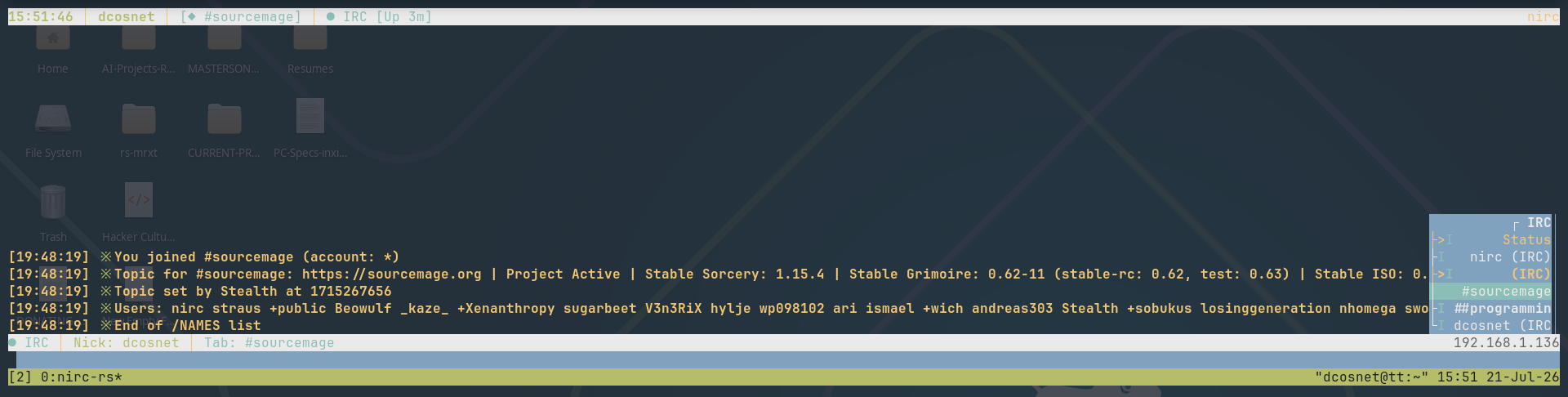
The TUI is built on ratatui 0.29 with crossterm 0.28 for terminal abstraction. The layout follows the established naim model: a dominant chat area, a single-line status bar at the top, and a single-line input bar at the bottom — because that arrangement has proven over two decades to be the most efficient use of vertical screen real estate for text communication.
Color System
Colors are managed through NaimPalette, a 15-field struct that maps directly to naim's c00–c14 configuration indices. Three foreground tiers (event, text, self/buddy), six buddy states (normal, idle, away, offline, waiting), and six background categories (input, window list, window list highlight, connection panel, chat window, status bar) are each assigned an 8-color NaimColor value. Four theme presets (Naim, Freesbie, Dark, Solarized) ship with the client, and every individual color field can be overridden in config.toml.
Window Management
Windows are first-class objects in the tab model. Each window carries its own message buffer, input line, cursor position, command history, scroll offset, and unread counter. Ctrl-N walks windows in static insertion order (as of 0.10.1 — the previous activity-tier priority system was reverted because users found the reordering non-deterministic and hard to build muscle memory around). Tabs that aren't cyclable (unjoined IRC channels, hidden server tabs) are skipped, but the relative order of the remaining tabs is preserved.
The window list (F4 to cycle through Auto/Visible/Hidden) displays protocol badges, per-window unread indicators, and highlights the active window. It occupies a fixed-width column on the right side of the chat area, overlapping rather than displacing message content — the same spatial model that made naim's window list usable on 80-column terminals.
Dropdown Menu Bar
The F1 menu bar provides discoverable, mouse-free access to every command in the client. It follows the QBasic 4.5 / aptitude interaction model: arrow keys navigate headings and items, Enter dispatches, Escape closes. Menu items use two dispatch conventions: direct commands (the action string is the exact /command) and prompt mode (a __prompt: prefix pre-fills the input bar with the command skeleton so you can provide the required arguments and press Enter). This dual convention means the menu can safely dispatch stateless actions immediately while gracefully deferring commands that need user input — no modal dialogs, no interruptions to flow.
Input Handling
The input bar supports UTF-8-safe cursor movement and deletion (Backspace respects character boundaries, not byte offsets), bracket paste insertion (pasted text lands at the cursor position, not appended), and per-tab command history navigated with Up/Down arrows. Tab completion cycles through nicknames and commands; if the input line is empty, Tab advances to the next window instead.
Security
Security is implemented as a layered defense, not a single checkbox.
Transport Encryption
All network connections default to TLS via rustls with webpki-roots. There is no fallback to plaintext unless explicitly configured — the tls = false flag exists for legacy networks that haven't deployed certificates, but the default path is encrypted end-to-end to the server.
Identity Vault
Credentials are stored in an AES-256-GCM encrypted vault at ~/.nirc/vault.json. The encryption key is derived from the user's master password using Argon2id (64 MiB memory cost, 3 iterations) to resist brute-force attacks even if the vault file is exfiltrated. The vault's Drop implementation zeroizes the in-memory key with the zeroize crate, ensuring credentials don't persist in swap or core dumps after the client exits. The salt is generated once at creation time and reused on every flush — generating a fresh salt per write would desynchronize it from the in-memory key, silently locking the user out of their own vault.
ADC Security Pipeline
The ADC adapter implements a varnish-style guard pipeline that inspects every inbound connection and request:
- Rate limiting — throttles connection attempts per source IP to prevent flooding
- IP validation — rejects private-range (10.0.0.0/8, 172.16.0.0/12, 192.168.0.0/16) and link-local addresses to prevent SSRF attacks where a malicious hub instructs the client to connect to internal services
- Path traversal blocking — rejects file paths containing
..sequences to prevent reading files outside the intended download directory
Memory Safety
Rust's ownership model eliminates use-after-free, buffer overflows, and data races at compile time. Sensitive key material uses the zeroize derive macro to guarantee secure memory clearing. The DashMap concurrency primitive provides lock-free concurrent access to the transfer manager's state.
File Transfers
File transfers use a purpose-built wire protocol multiplexed over yamux, which allows multiple simultaneous transfers over a single TCP connection — avoiding the port-forwarding nightmare that plagued DCC file transfers in traditional IRC clients.
Wire Protocol
Each transfer begins with a fixed header: 4-byte magic (NAIM), 2-byte version, flags byte, 8-byte file size, 8-byte resume offset, variable-length filename, and an optional 64-byte SHA-256 digest — all little-endian. This header is sent once; the payload stream follows immediately.
Transfer Pipeline
- I/O buffers — 256 KiB buffers minimize syscalls and maximize throughput on both high-latency and high-bandwidth connections
- In-flight verification — SHA-256 is computed during the transfer, not after, so a corrupted stream is detected the moment the last byte arrives rather than requiring a separate post-transfer pass
- Resume support — interrupted transfers write to a
.partialfile and record the offset. On resume, the receiver sends the offset in the header, and the sender seeks to that position. On completion, the.partialfile is atomically renamed to the final filename - Size cap — a 2 GiB maximum per file prevents resource exhaustion from malicious or misconfigured peers
- Cancellation — each transfer carries a
tokio::CancellationTokenthat immediately terminates the associated I/O task without waiting for the stream to drain
Transfer Ticker
Active transfers are displayed in a rotating ticker in the status bar footer. The ticker cycles through transfers every few seconds, showing the filename, progress percentage, current speed, and estimated time remaining — providing at-a-glance awareness without dedicating screen space to a full transfer panel.
Extensibility
Plugin System
Plugins are loaded as .so shared libraries (Linux) or .dylib (macOS) from ~/.nirc/plugins/ at startup. Each plugin must expose a single C ABI factory function:
extern "C" fn nirc_plugin_create() -> *mut dyn nirc::plugins::Plugin;
The Plugin trait defines lifecycle hooks (on_load/on_unload), event hooks (MessageReceived, PreCommand, PostCommand, ProtocolConnected, Shutdown), and a custom command registration system. Plugins can consume events (preventing further processing), modify them, or emit responses. A built-in UrlDetectorPlugin demonstrates the hook system by scanning incoming messages for URLs.
Plugin commands integrate directly into the client's command dispatcher — no separate namespace, no special prefix. If a plugin registers a command named greet, typing /greet dispatches to the plugin's on_command handler just like any built-in command.
Variables, Aliases, and Key Bindings
The VarStore subsystem provides three intertwined extensibility mechanisms:
- Variables (
/set,/get) — string key-value pairs expandable as$nameor${name}in any command or message text - Aliases (
/alias,/unalias) — named command templates with positional argument substitution ($1,$2, ...,$*for all args). An alias defined as/alias hi /msg $1 hello $2expands/hi alice thereto/msg alice hello there - Key bindings (
/bind,/unbind) — map any key notation (^R,M-Tab,F5,Ctrl-W) to a command string. Bindings are normalized to a canonical form so^RandC-Rresolve to the same binding
The /eval command expands $vars in arbitrary text, and /source <file> executes a file of commands line-by-line with full variable and alias expansion. All three stores (variables, aliases, bindings) persist across sessions via the config save system.
Logging
Per-channel logging writes one file per window under $XDG_DATA_HOME/nirc/logs/ in naim-compatible format. Each log line is prefixed with a bracketed timestamp and formatted according to message kind:
[12:00:01] <alice> message body          (channel text)
[12:00:15] *alice* PM text               (query/PM)
[12:00:22] *** server notice             (system message)
[12:00:30] -nick- notice body            (notice with sender)
[12:00:45] * nick action text            (CTCP ACTION / /me)
[12:01:00] *** Error: description        (error)
[12:01:15] [FILE] filename.ext           (file transfer event)
Log files are opened lazily on first write and kept open for appending. When a file exceeds the configured size limit (default 10 MiB), it is rotated: the current file becomes .log.1, the previous .log.1 becomes .log.2, and so on. Rotated files are retained indefinitely — no automatic deletion. The total on-disk footprint is unbounded by default, constrained only by available disk space. Filesystem errors are caught and reported via tracing::warn — the client never panics due to a log write failure.
Notifications
The notification engine supports two delivery channels with independent enable/disable flags:
- Desktop notifications — delivered via the system's native notification backend (XDG notifications on Linux, NSUserNotification on macOS) with configurable urgency levels (low, normal, critical)
- Terminal bell — emits
\x07to trigger the terminal emulator's visual or audible bell indicator
Both channels share a configurable debounce interval (default 2000 ms) that prevents notification storms during high-traffic conversations. Highlight words are configurable per-server, and the client tracks a set of extra highlight words that trigger notifications even in non-focused windows.
Command Reference
nirc-rs provides a unified slash-command interface. Every command is available both via the input bar (/command) and the F1 dropdown menu, giving you two complete paths to every action.
Connection and Session
| Command | Description |
|---|---|
/connect <protocol> <server> |
Open a connection to the specified server |
/disconnect [protocol] |
Disconnect the specified protocol, or all |
/newconn [label] [protocol] |
Create a new connection context |
/server [server] [port] |
Change server address |
/quit [reason] |
Disconnect all protocols and exit |
Window Management
| Command | Description |
|---|---|
/jump [target] |
Switch to the named window, or next unread |
/jumpback |
Return to the previously active window |
/close [target] |
Close a window or part a channel |
/open <name> |
Open a new query window |
/win [N] |
Switch to window by index, or list all |
/win new |
Create a new empty window |
/win close [name] |
Close window by name |
/win name <name> |
Rename the current window |
Channel Operations
| Command | Description |
|---|---|
/join <channel> |
Join a channel |
/part [channel] |
Leave a channel |
/names [channel] |
List users in a channel |
/topic [channel] [topic] |
View or set the channel topic |
/op <nick> |
Grant operator status |
/deop <nick> |
Revoke operator status |
/kick <nick> [reason] |
Remove a user from the channel |
/invite <nick> [channel] |
Invite a user to the channel |
/mode <target> <mode> [params] |
Set channel or user modes |
/who [target] |
Query user information |
/list [channel] |
List available channels |
Messaging
| Command | Description |
|---|---|
/msg <target> <body> |
Send a private message |
/me <body> |
Send a CTCP ACTION |
/notice <target> <message> |
Send a notice |
/say <message> |
Send text to the current window |
/echo <message> |
Display text without sending |
/dm <nick> [message] |
Open a query and optionally send a message |
/ctcp <target> [request] [msg] |
Send a CTCP request |
IRC Operator Commands
| Command | Description |
|---|---|
/oper <name> <password> |
Authenticate as a server operator |
/kill <nick> [reason] |
Force-disconnect a user |
/kline <mask> [duration] [reason] |
Set a K-line ban |
/unkline <mask> |
Remove a K-line ban |
/wallops <message> |
Broadcast to all operators |
/raw <line> |
Send a raw protocol line |
/quote <line> |
Alias for /raw |
User Management
| Command | Description |
|---|---|
/nick <newnick> |
Change your nickname |
/away [message] |
Set or clear away status |
/whois <target> |
Query user details |
/ignore [target] |
Toggle ignore on a user |
/unblock <target> |
Remove an ignore |
File Transfers
| Command | Description |
|---|---|
/sendfile <target> <path> |
Send a file to a user |
/xfer <protocol> <target> [path] |
Send a file on a specific protocol |
/acceptfile <id> <save_path> |
Accept an incoming file transfer |
/transfers |
List active file transfers |
Identity Vault
| Command | Description |
|---|---|
/vault create <password> |
Create a new encrypted vault |
/vault unlock <password> |
Unlock the vault |
/vault lock |
Lock the vault (zeroizes keys from RAM) |
/vault add <name> <protocol> <creds> |
Store an identity |
/vault remove <name> |
Remove a stored identity |
/vault list |
List all stored identities |
Extensibility
| Command | Description |
|---|---|
/set <var> [value] |
Set a variable (empty value clears) |
/get <var> |
Print a variable's value |
/alias <name> <command> |
Define a command alias |
/unalias <name> |
Remove an alias |
/bind <key> <command> |
Bind a key to a command |
/unbind <key> |
Remove a key binding |
/eval <text> |
Expand variables and evaluate |
/source <file> |
Execute a file of commands |
Protocol-Specific Commands
Matrix: /matrix login, /matrix logout, /matrix create, /matrix invite, /matrix members, /matrix whoami, /matrix verify, /matrix devices, /matrix backfill, /matrix react, /matrix reply
ADC/DC++: /adc search, /adc users, /adc broadcast, /adc get
Discord / Stout / Spacebar / Nerimity: /<protocol> join, /<protocol> leave, /<protocol> members, /<protocol> servers
Media (0.10.1): /url <url>, /video <url>, /image <url> — open URLs externally, launch video in the OS default player, or attempt inline image rendering (falls back to /url if the terminal doesn't support inline images).
BitChat: Removed in 0.10.2. See NOTICES.md for the rationale.
UI and Display
| Command | Description |
|---|---|
/clear |
Clear the current window's message buffer |
/clearall |
Clear all window buffers |
/winlist [auto|visible|hidden] |
Control window list visibility |
/save |
Persist configuration to disk |
/load [path] |
Reload configuration from disk (default location or custom path) |
/help |
Show the help overview |
/version |
Show client version |
/info |
Show client version and build information |
Key Bindings
| Key | Action |
|---|---|
Enter |
Send message or command |
Backspace |
Delete character before cursor (UTF-8 safe) |
Delete |
Delete character after cursor |
Left / Right |
Move cursor in input line |
Home / End |
Previous / next window |
Insert |
Scroll chat to bottom (release scroll lock) |
Ctrl-N |
Next window (insertion order, skips unjoined IRC channels) |
Ctrl-B |
Jump back to previously active window |
Ctrl-P |
Previous buffer |
Ctrl-A |
Next active buffer |
Ctrl-Z |
Cycle through highlight senders |
Ctrl-W |
Delete word before cursor |
Ctrl-K |
Delete from cursor to end of line |
Ctrl-A / Ctrl-E |
Cursor to start / end of line |
Ctrl-U |
Clear entire input line |
Ctrl-L |
Force terminal redraw |
Ctrl-V |
Toggle join/quit/part notifications |
Ctrl-C |
Quit nirc-rs |
Tab |
Tab-complete (nick/command), or next window if input is empty |
F1 |
Toggle dropdown menu bar |
F4 |
Cycle window list visibility (Auto / Visible / Hidden) |
PgUp / PgDn |
Scroll chat history (PgUp locks view; PgDn releases) |
Up / Down |
Navigate command history |
Configuration
Configuration lives at ~/.nirc/config.toml and is created automatically on first run with sensible defaults. Every setting has a documented default; the client works without any configuration beyond your server address.
Auto-load and manual reload
At startup nirc-rs auto-loads any config file found at the default location (~/.nirc/config.toml on Linux, ~/Library/Application Support/nirc/config.toml on macOS, %APPDATA%\nirc\config.toml on Windows). If no config is present, defaults are used and a Status-tab notice tells you so. The auto-load result is announced on the Status tab so you can tell at a glance where your settings came from.
A 5-second mtime watcher hot-reloads the config whenever the file changes on disk — so editing config.toml in your editor is picked up automatically without a restart. To force a reload on demand (for example after restoring a config from a backup, or to silence a "did the watcher catch that?" doubt), use:
/load              # reload from the default config location
/load ~/alt.toml   # reload from a specific path (supports ~ expansion)
/load with no argument is the natural complement to /save: edit the file, then /load to pick up the changes. On success the theme, palette, nickname, and all server presets are re-applied live; on failure (file missing or malformed) the current config is left untouched and an error is shown in the Status tab.
[global]
nickname = "yournick"
realname = "Your Name"
log_level = "info"              # error | warn | info | debug | trace
auto_connect = ["libera"]       # servers to connect on startup

# ─── Servers ────────────────────────────────────────────────────────────
[[servers]]
name = "libera"
protocol = "irc"                # irc | matrix | adc | discord | stout | spacebar | nerimity  (bitchat removed in 0.10.2)
address = "irc.libera.chat:6697"
tls = true
auto_join = ["#rust", "#nirc"]
auto_reconnect = true

[servers.extra]
sasl_mechanism = "plain"
sasl_username = "your-account"
sasl_password = "your-password"

# ─── Appearance ─────────────────────────────────────────────────────────
[appearance]
theme = "default"               # default | solarized | gruvbox | dracula
show_timestamps = true
clock_24h = true
max_scrollback = 5000

[appearance.custom_colors]
# Override any theme color by field name:
# accent = "#FF79C6"
# error_fg = "#FF5555"
# bg = "#1E1E2E"

# ─── Notifications ──────────────────────────────────────────────────────
[notifications]
desktop_enabled = true
bell_enabled = true
debounce_ms = 2000
extra_highlight_words = ["urgent", "ops"]

# ─── File Transfers ─────────────────────────────────────────────────────
[transfers]
download_dir = "~/downloads"
buffer_size = 262144            # 256 KiB
max_concurrent = 3
auto_accept_from = []

# ─── Custom Keybindings ─────────────────────────────────────────────────
[keybindings]
# "F5" = "/connect irc libera"
# "Ctrl-G" = "/jump"
Matrix Configuration
[[servers]]
name = "matrix"
protocol = "matrix"
address = "https://matrix.org"
auto_join = ["#nirc:matrix.org"]

[servers.extra]
user_id = "@alice:matrix.org"
password = "hunter2"
device_id = "NIRC-DEVICE-1"
device_name = "nirc-rs"
# access_token = "syt_abc..."   # for session resume without password
BitChat P2P Configuration — REMOVED in 0.10.2
BitChat server entries are no longer accepted. Any [[servers]] entry with
protocol = "bitchat" will be silently ignored at load time. See
NOTICES.md for the full rationale. If you previously had a
BitChat entry in your config, you can leave it (it will be ignored) or
remove it to clean up:
# REMOVE THIS — no longer used:
# [[servers]]
# name = "bitchat"
# protocol = "bitchat"
# address = "/ip4/0.0.0.0/tcp/9394"
# [servers.extra]
# bootstrap = "/ip4/1.2.3.4/tcp/9394/p2p/QmSomePeerId"
Installation
From Source (Recommended)
# Requires Rust 1.75+ (via rustup) and a C compiler
git clone https://git.dcos.net/dcosnet/nirc-rs.git
cd nirc-rs
cargo build --release
cp target/release/nirc-rs ~/.local/bin/
Via Cargo
cargo install nirc-rs
System Packages
Arch Linux (AUR), Debian/Ubuntu .deb, RPM .spec, and Nix flake are available in the packaging/ directory. Shell completions for bash, zsh, and fish are provided in completions/. A man page is provided in man/man1/nirc.1.
Quick Start
nirc-rs
The client creates ~/.nirc/config.toml with defaults and opens the TUI. Connect to an IRC server:
/connect irc irc.libera.chat:6697
/join #rust
That's it. See QUICKSTART.md for a detailed walkthrough covering multi-protocol setup, the identity vault, file transfers, and key binding customization.
Contributing
Contributions are welcome. The project targets Rust edition 2021 with a minimum Rust version of 1.75+.
git clone https://git.dcos.net/dcosnet/nirc-rs.git
cd nirc-rs
cargo test
cargo build --release
For bug reports, feature requests, or protocol testing, visit https://git.dcos.net/dcosnet/nirc-rs.
License
nirc-rs is free software: you can redistribute it and/or modify it under the terms of the GNU General Public License as published by the Free Software Foundation, either version 3 of the License, or (at your option) any later version.
See LICENSE for the full text.
Copyright (C) 2026 Jeremy Anderson — dcos.net