 Jeremy Anderson
963ce3e4b3
Jeremy Anderson
963ce3e4b3
|
||
|---|---|---|
| src | ||
| Cargo.lock | ||
| Cargo.toml | ||
| LICENSE | ||
| QUICKSTART.md | ||
| README.md | ||
| build.sh | ||
| screenshot.png | ||

README.md
Scitano 2.0
Jeremy Anderson — info@dcos.net https://git.dcos.net/dcosnet/scitano/
A hotkey-first programmer's editor built in Rust on the iced GUI framework. Scitano combines the menu structure of SciTE, strict GNU nano hotkeys, and Geany-inspired sidebar and context features into a single unified editing environment with a VS Code Dark+ visual overhaul.
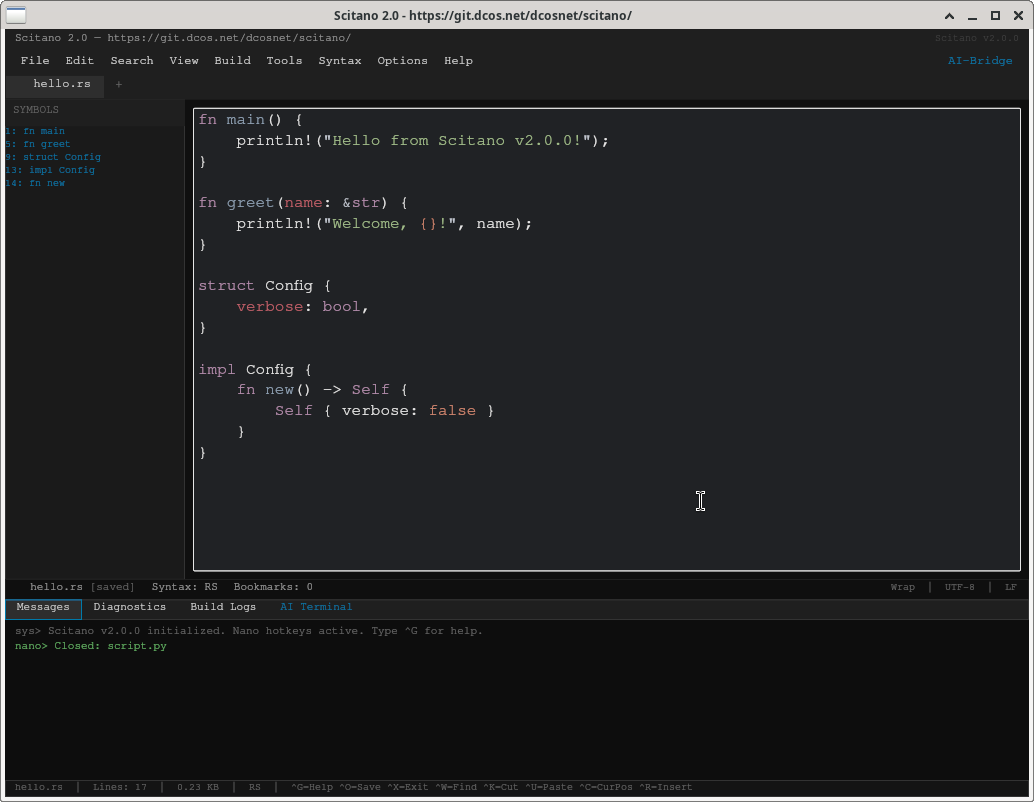
What's New in 2.0
- VS Code Dark+ Visual Overhaul — Complete theme rewrite matching the VS Code Dark+ color palette (#0F0F0F editor, #1E1E1E panels, #007ACC accent blue)
- Production QA Pass — Five-discipline review (QA/SRE/SA/Admin/DevOps) with all findings resolved
- Data-Driven Architecture — Nested if/else chains replaced with const lookup tables (SEI CERT/MISRA/POSIX compliant)
- Bounded Memory — Chat log enforces 512 KB / 10,000 entry hard limits
- Shell-Injection Safe — All build commands use argument vectors, no
format!()shell strings - Compiler Warning Clean — Zero warnings on
cargo checkwith targeted#[allow(dead_code)]only on future-ready API - Clippy Lint Configuration —
[lints.clippy]section with 10 SEI CERT/MISRA-aligned warnings - Release Profile — LTO, codegen-units=1, strip=true, panic=abort for minimal binary size
Features
- Strict Nano Hotkeys —
^K/^Ukill-ring,^Owriteout,^Xexit,^Wsearch, and more — all faithful to GNU nano behavior - SciTE-Style Menus — File, Edit, Search, View, Build, Tools, Syntax, Options, Help, and AI-Bridge menus across the top
- Geany-Inspired Sidebar — Symbol tree auto-parses
fn,struct,impl,enum,trait,class,def,mod, andmacro_rules!definitions - Multi-Tab Editing — Multiple buffers with dirty indicators (
●), right-click close, and+to create new tabs - Syntax Highlighting — 50+ file extensions across 20+ languages with manual override via the Syntax menu
- Dual Highlight Tones — CandyPop (Base16 Ocean) and Matte (Base16 Mocha) switchable from the View menu
- Bottom Panel — Messages, Diagnostics, Build Logs, and AI Terminal panes with color-coded prefix output
- Right-Click Context Menu — Quick access to Save, Close, Build, Lint, Comment/Uncomment, and case transforms
- Build Integration — Compile-only, build-and-run, run-only, and lint with output routed to the Build Logs pane
- AI Bridge — Aider and Hermes/Odysseus integration points for AI-assisted editing
- Structured Status Bar — File name, dirty state, syntax, bookmark count, wrap mode, encoding, line endings
- Footer Hotkey Bar — Persistent nano hotkey reference always visible at the bottom
Quickstart
Prerequisites
- Rust 1.75+ (edition 2021)
- A system display server (X11 or Wayland with XWayland)
- For linting:
shellcheck,python3,gcc/g++,rustc,node(as needed per language)
Build
git clone https://git.dcos.net/dcosnet/scitano.git
cd scitano
cargo build --release
Or use the included build script:
chmod +x build.sh
./build.sh
The release binary will be at target/release/scitano.
Run
./target/release/scitano
Scitano launches with two sample buffers (hello.rs and script.py) so you can start editing immediately.
Install (system-wide)
cargo install --path .
See QUICKSTART.md for detailed setup instructions.
Hotkey Reference
All hotkeys follow GNU nano conventions. ^ denotes Ctrl. Hotkeys are active when no text is selected and the editor has focus.
Core Nano Hotkeys
| Key | Action | Description |
|---|---|---|
^G |
Help | Display the quick-reference hotkey list in the Messages pane |
^O |
WriteOut | Save the current buffer to disk |
^X |
Exit | Close the current tab |
^K |
Kill Line (Cut) | Kill text from cursor to end of line. Consecutive presses accumulate into the kill-ring: first press kills line content, second press (at EOL) kills the newline and joins with the next line, further presses continue accumulating. Any non-^K action resets the accumulation. |
^U |
Unkill (Paste/Yank) | Insert the entire kill-ring at the cursor position. Cursor advances to the end of the pasted text. Resets the consecutive-kill flag. |
^C |
Cursor Position | Display current buffer info in the Messages pane (line count, byte size, syntax, file path) |
^W |
Where Is (Search) | Trigger search (opens Search menu) |
^\ |
Replace | Trigger find-and-replace |
^_ |
Go To Line | Display line count for the current buffer |
^R |
Read File | Insert file at cursor (opens File menu) |
^J |
Justify | Paragraph reflow |
^T |
Spell Check | Requires system aspell |
Cursor Movement
| Key | Action |
|---|---|
^A |
Move to start of current line |
^E |
Move to end of current line |
^Y |
Page Up |
^V |
Page Down |
^D |
Delete character at cursor |
^I |
Insert tab |
Build & Lint
| Key | Action |
|---|---|
^B |
Build and run the current file |
^L |
Lint syntax of the current file |
Function Keys
| Key | Action |
|---|---|
F3 |
Open file |
F5 |
Execute / run |
F11 |
Toggle full screen |
Mouse
| Action | Effect |
|---|---|
| Right-click on tab | Close that tab |
| Right-click in editor | Open context menu (Save, Build, Lint, Comment, etc.) |
Kill-Ring Behavior (^K / ^U)
The kill-ring faithfully replicates GNU nano's cut/paste model:
- Mid-line
^K— Kills all text from the cursor to the end of the current line (text only, not the line break). Cursor stays in place. - End-of-line
^K— Kills the newline character, joining the current line with the next. Cursor sits at the junction point. - Empty-line
^K— Same as end-of-line: removes the line by joining with the next. - Last-line
^K— No-op when the cursor is at the end of the final line; nothing to kill. - Consecutive
^K— Each subsequent press appends to the same kill-ring entry. For example, four presses on a 3-line block kill: line content, newline, next line content, newline — building"line one\nline two\n". ^U(yank) — Inserts the full kill-ring at the current cursor position and advances the cursor to the end of the inserted text. Resets the consecutive-kill flag.- Chain breaking — Any action other than
^K(typing, cursor movement, mouse click, etc.) resets the kill chain so the next^Kstarts a fresh kill-ring entry.
Menu Structure
File
New · Open (F3) · Open Selected · ^O WriteOut (Save) · Save As... · ^X Close Tab · Reload File · Save Session · Load Session · Print... · Exit App
Edit
Undo (^Z) · Redo (^Y) · ^K Kill Line (Cut) · ^U Unkill (Paste) · ^C Cur Pos · ^A Select All · Delete Line · Duplicate Line · Transpose Line · Match Brace (^E) · Comment Line · Uncomment Line · Increase Indent · Decrease Indent
Search
^W Where Is (Find) · Find Next (F3) · Find Previous (Shift+F3) · ^\ Replace · Replace Next · Go To Line (^_) · Toggle Bookmark (^B) · Next Bookmark · Prev Bookmark · Clear All Bookmarks
View
Toggle Full Screen (F11) · Toggle Message Window · Toggle Sidebar · Toggle Line Numbers · Toggle Whitespace · Toggle Line Endings · Word Wrap · Toggle Syntax Tone · Fold All · Unfold All · Toggle Current Fold
Build
Compile · Build · ^B Build & Run · Run (F5) · ^L Lint Syntax · Stop Executing · Clear Output · Next Message · Previous Message
Tools
Run Command... · Run Lua Script (F5)
Syntax
Rust · Python · C/C++ · Shell · JavaScript · TypeScript · Markdown · HTML · CSS · JSON · XML · YAML · Go · Ruby · PHP · Java · C# · SQL · Clear Override
Options
Global Properties · Open Abbreviations · User Properties · Local Properties
Help
^G Help · About
AI-Bridge
Sync Aider Models · Aider: Architect Mode · Aider: Code Review · Aider: Refactor Buffer · Hermes: Local Inference · Hermes: System Prompt · Odysseus: Crawl Context · Odysseus: Vector Sync
Editor Context (right-click)
^O Save Buffer · ^X Close Tab · ^B Build File · ^L Lint Syntax · Comment Selection · Uncomment Selection · Upper Case · Lower Case · Insert Timestamp
Supported Languages
Syntax highlighting is auto-detected by file extension. Manual override is available via the Syntax menu.
| Extension | Language | Extension | Language |
|---|---|---|---|
.rs |
Rust | .rb |
Ruby |
.py .pyw |
Python | .php .phtml |
PHP |
.c .h |
C | .java |
Java |
.cpp .hpp .cc .cxx .hxx |
C++ | .cs |
C# |
.sh .bash .zsh .command |
Shell | .sql |
SQL |
.js .mjs .cjs |
JavaScript | .r |
R |
.ts .tsx |
TypeScript | .lua |
Lua |
.md .markdown |
Markdown | .pl .pm |
Perl |
.html .htm .xhtml |
HTML | .ex .exs |
Elixir |
.css .scss .sass .less |
CSS | .hs |
Haskell |
.json |
JSON | .scala |
Scala |
.xml |
XML | .swift |
Swift |
.yaml .yml |
YAML | .kt .kts |
Kotlin |
.toml |
TOML | .dart |
Dart |
.ps1 .psm1 |
PowerShell | .bat .cmd .dosbat |
Batch |
.conf .cfg .ini .service .target |
Config/INI | .vbs .vbe |
VBScript |
| Dockerfile / Containerfile | Dockerfile | .go |
Go |
Makefile |
Makefile | Nginx configs | Nginx |
*.rc files |
Shell | Apache/httpd configs |
Apache |
Project Structure
scitano/
├── Cargo.toml          # Package manifest (iced 0.13, edition 2021, GPLv2, rust-version 1.75)
├── Cargo.lock          # Dependency lockfile
├── LICENSE             # GPLv2 full text
├── build.sh            # Release build script with checks
├── QUICKSTART.md       # Detailed setup and usage guide
├── screenshot.png      # Application screenshot
├── README.md           # This file
└── src/
    ├── main.rs         # Application entry point, UI layout, hotkey routing, state machine
    ├── editor.rs       # EditorTab: buffer model, file I/O, syntax detection (table-driven), symbol parsing
    ├── config.rs       # User configuration (tab width, wrap, auto-save) with validation
    └── theme.rs        # VS Code Dark+ palette, data-driven container/button style factories
Coding Standards Applied
This codebase follows a multi-discipline production readiness review:
- SEI CERT — Bounded memory, input validation, no shell injection, argument-vector-only commands
- MISRA — Data-driven dispatch tables instead of nested if/else, explicit loop bounds
- POSIX — Clean exit paths, no undefined behavior, structured error propagation
- PEP 868 — Table-driven configuration, declarative over imperative
- Clippy — 10 lint rules enforced:
unwrap_used,indexing_slicing,arithmetic_side_effects,cast_*,integer_division,manual_range_contains
License
GPLv2 — see LICENSE for the full text.
Jeremy Anderson — info@dcos.net — https://git.dcos.net/dcosnet/scitano/